
I-765 Work Permit Photo Maker
Upload a clear photo of your face. The tool turns it into a 2×2 inch passport-style photo with a white background, so you can print matching photos for your EAD application.
- 2×2 in (51×51 mm)
- Two identical prints
- White background
- 4×6 print sheet
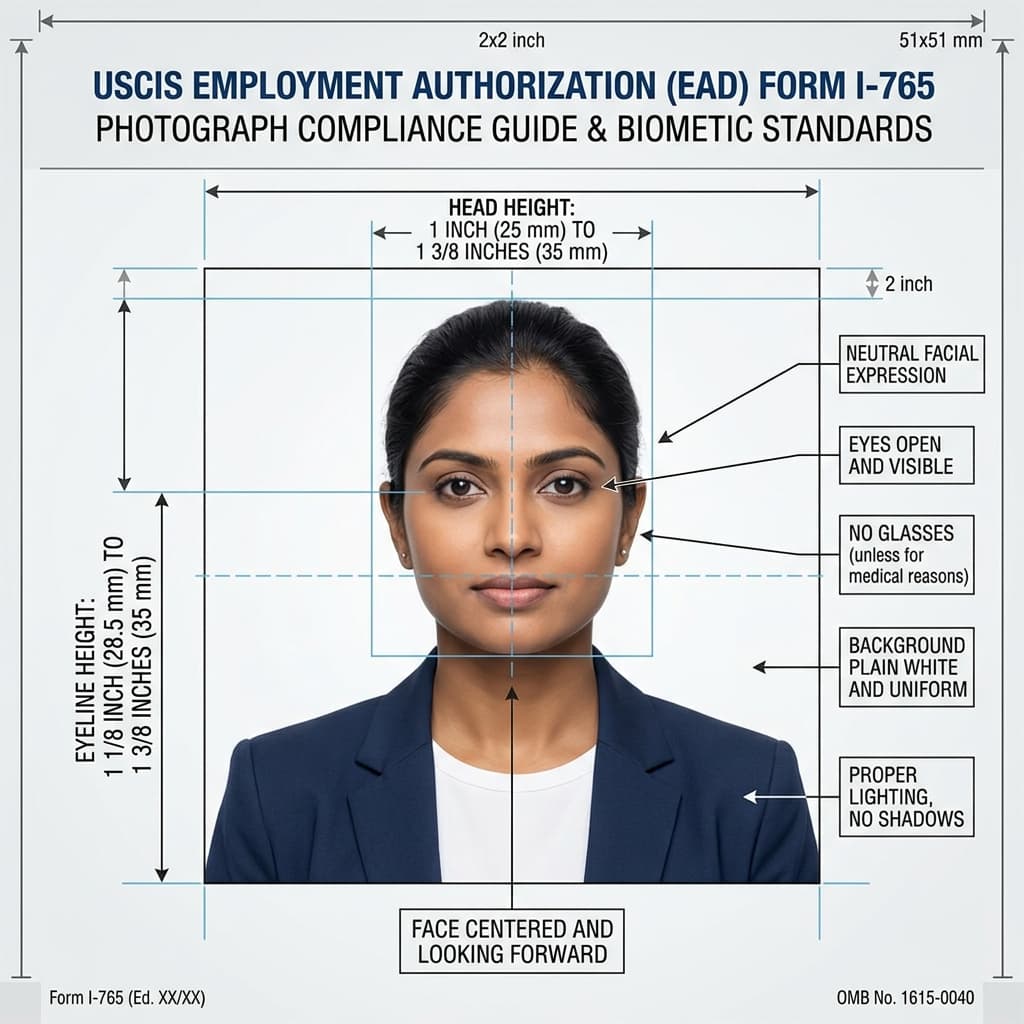
USCIS EAD Form I-765 Biometric Compliance Guide
Format Your Photo Instantly
Take or choose a front-facing photo from your camera or gallery. Preview the cropped I-765 photo with an official white background for free.
I-765 photo formatted to 600x600 px for United States
Choose a photo or drag it here
JPEG, PNG, or WebP up to 20 MB · Front-facing camera or portrait
Select PhotoPassport Photo Checklist:
How to make your I-765 photos
- 01
Upload a recent photo
Take a new front-facing color photo in even light. Check your form's instructions for how recent it needs to be.
- 02
Preview the 2×2 crop
The tool centers your face and replaces the background with white. The preview is free, so you can retry with a better photo.
- 03
Print a 4×6 sheet
Download the photo and place six identical 2×2 copies on one 4×6 sheet with the free print template generator.
- 04
Cut and label
Print at a pharmacy or at home, cut two photos along the guides, and lightly write your name and A-Number on the back.
Paper filing vs. online filing
If you file Form I-765 on paper, the instructions ask for two identical passport-style photos. If you file online, photos may be handled differently. Check the I-765 instructions for your filing method before you print.
Why identical photos matter
Both prints should come from the same image. Printing one 4×6 sheet with six copies of the same file gives you two matching photos plus spares for a renewal or another USCIS form, as long as they are still recent enough.
Labeling your photos without damaging them
- Write on the back only, and press lightly so the ink or pencil does not show through.
- Use a pencil or felt pen. Ballpoint pens can dent the photo and smudge on glossy paper.
- Let the print dry fully before you write on it or put it in an envelope.
- Follow the form instructions for how to include the photos with your application.
Frequently Asked Questions
How many photos do I need for Form I-765?
Paper filings ask for two identical passport-style photos. Online filings may handle photos differently, so check the I-765 instructions for how you are filing.
How recent does my EAD photo need to be?
Take a new photo for each I-765 filing. The I-765 instructions say how recent it must be (USCIS forms commonly use 30 days), so check them before you reuse older prints.
What do I write on the back of my I-765 photos?
Lightly print your name and A-Number, if you have one, in pencil or felt pen. Write on the back only.
Can I print my work permit photos at home?
Yes. Print the 4×6 sheet on photo paper at 100% scale, with no fit-to-page option. Measure one photo to confirm it is 2 × 2 inches before you cut.
Should I wear glasses in my EAD photo?
Remove them if you can to avoid glare on the lenses, which can hide your eyes.
Do I pay per printed copy?
No. The preview is free and the photo is a $9.99 download. You can print as many copies of it as you need with the free 4×6 sheet generator.
USVisaPhotoAI is an independent photo service. It is not affiliated with the U.S. Department of State, USCIS, or any government agency. Final acceptance of any photo is decided by the agency reviewing your application.