
US Passport Photo Maker
Upload a photo taken with your phone. The tool crops it to the 2×2 inch US passport layout and replaces the background with white, so you can print it for your DS-11 application.
- 2×2 in (51×51 mm)
- White background
- DS-11 & passport card
- Print-ready
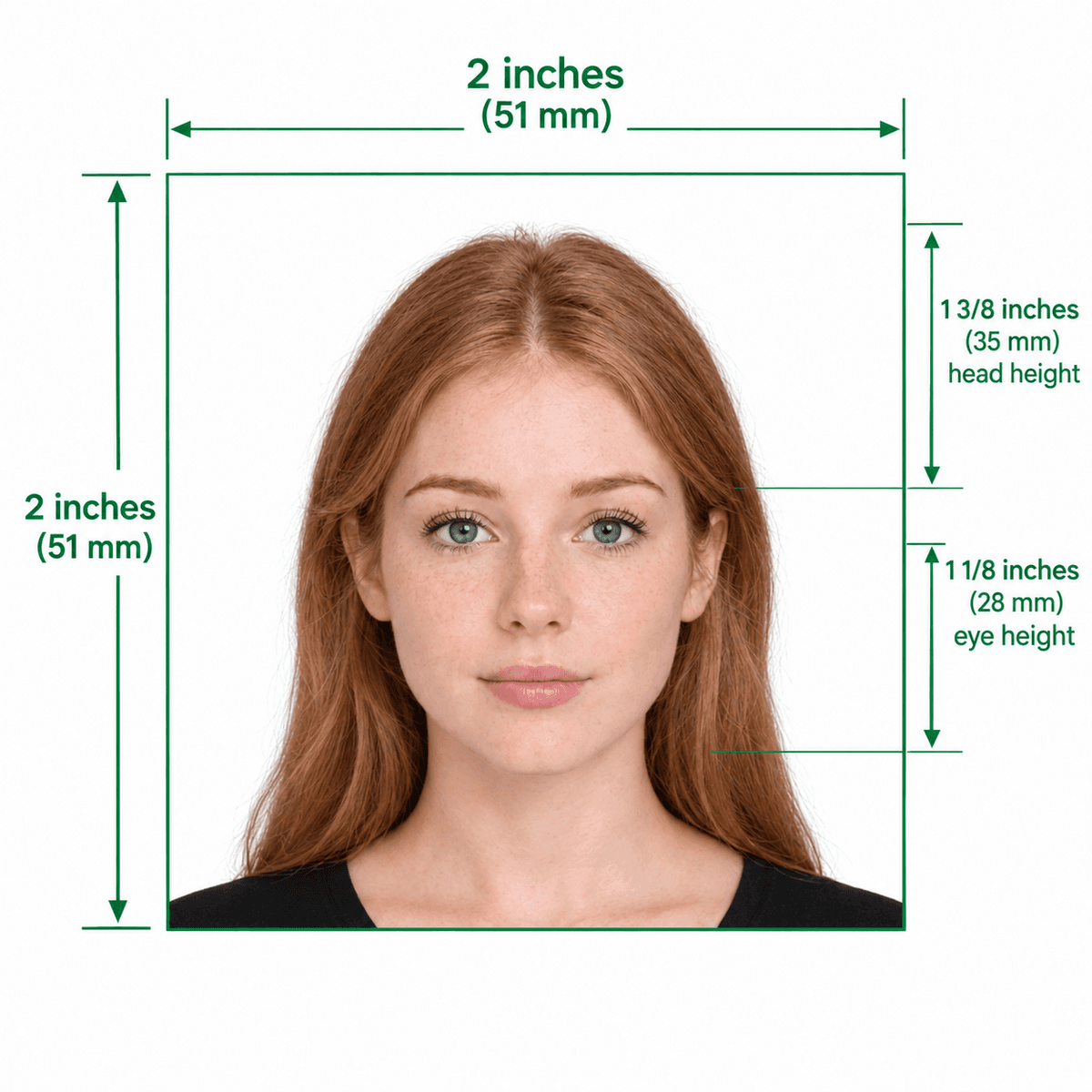
U.S. Department of State Official 2×2″ Proportions Guide
Format Your Photo Instantly
Take or choose a front-facing photo from your camera or gallery. Preview the cropped US passport photo with an official white background for free.
US passport photo formatted to 600x600 px for United States
Choose a photo or drag it here
JPEG, PNG, or WebP up to 20 MB · Front-facing camera or portrait
Select PhotoPassport Photo Checklist:
How to make your US passport photo
- 01
Take the picture
Stand in front of any wall in soft, even light and have someone photograph you from about 4 feet away, head and shoulders in frame.
- 02
Upload and preview
Upload the JPEG, PNG or WebP file. The tool crops your head to the 2×2 inch layout and swaps the background for white, usually in under a minute.
- 03
Download the photo
If the preview looks right, pay once to download the 600×600 px photo. The download link is emailed to you and works for 72 hours.
- 04
Print and attach
Print it on photo paper at 2×2 inches and include it with your passport application. Do not trim it smaller or write on it.
Which applications this photo is for
A first-time adult passport, a passport card, or a child's passport all use the same 2×2 inch photo rules. If you apply with Form DS-11, you include a printed photo with your paperwork.
Renewing by mail or online? See the passport renewal photo page. Making a photo for an infant? The baby passport photo page has tips for getting a usable shot.
Common reasons passport photos get rejected
- Shadows on the face or behind the head from overhead or side lighting.
- Glasses, even clear ones, unless you include a signed medical statement.
- Filters, beauty modes or retouching that change how you look.
- A blurry, dark or grainy original that cannot be printed sharply at 2×2 inches.
- A photo older than 6 months, or one that no longer looks like you.
Printing your passport photo
Your purchase includes the digital photo. To print, open the free print template generator: it places copies of your photo on a 4×6 inch sheet you can print at home or order as a standard photo print at a pharmacy or store.
Print at 100% scale, with no "fit to page" option, so each photo comes out at exactly 2×2 inches.
Frequently Asked Questions
Can I use a phone photo for a US passport application?
Yes, as long as it is sharp, evenly lit and taken straight on. Have someone else hold the phone instead of taking a selfie, which tends to distort your face.
Does the passport card need a different photo?
No. The passport card uses the same 2×2 inch photo rules as the passport book, so one photo works for both.
Can I smile in my passport photo?
A natural smile is fine. Keep both eyes open, face the camera directly, and avoid exaggerated expressions.
Can I wear a hijab, turban or other head covering?
Yes, if you wear it for religious or medical reasons. Your full face must be visible, and you may need to include a signed statement. Check the State Department photo page for details.
What file do I receive after paying?
A 600×600 px JPEG with a white background, sent as a download link that stays valid for 72 hours. You can use it with the free print template generator to make a 4×6 print sheet.
What if my passport photo is rejected?
If it is rejected because of its dimensions and you contact us within 30 days, we remake it or refund you under our refund policy. Rejections for other reasons, such as glasses or lighting, are not covered, so check the preview carefully.
USVisaPhotoAI is an independent photo service. It is not affiliated with the U.S. Department of State, USCIS, or any government agency. Final acceptance of any photo is decided by the agency reviewing your application.