
Passport Photo Background Remover
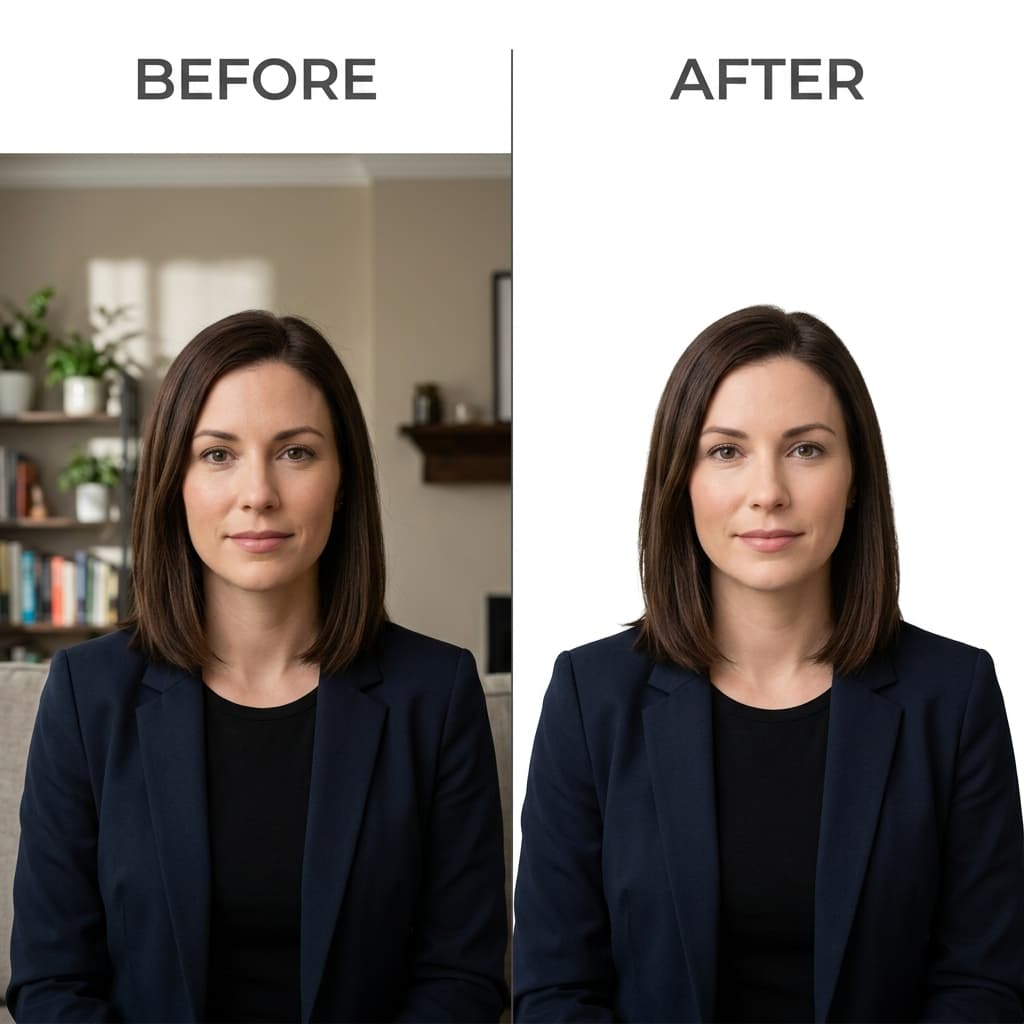
Have a good photo of yourself but the wrong background? Upload it and the tool replaces the background with plain white, then crops it to a 2×2 inch passport photo.
- Plain white background
- Cropped to 2×2 in
- 600×600 px JPEG
- Free preview
AI White Background Removal & Biometric Lighting
Format Your Photo Instantly
Take or choose a front-facing photo from your camera or gallery. Preview the cropped white-background passport photo with an official white background for free.
white-background passport photo formatted to 600x600 px for United States
Choose a photo or drag it here
JPEG, PNG, or WebP up to 20 MB · Front-facing camera or portrait
Select PhotoPassport Photo Checklist:
How to change your photo background to white
- 01
Upload your photo
Pick a JPEG, PNG or WebP up to 20 MB from your phone or computer. Your face should be clear, front-facing and evenly lit.
- 02
Background replaced and cropped
The tool separates you from the background, fills it with plain white, and centers your face in a 2×2 inch square layout.
- 03
Check the edges in the preview
Look closely at your hair and shoulders. If the edges look rough, try a photo taken against a plainer wall. Re-uploading is free.
- 04
Download
Pay once to download the 600×600 px JPEG. Use it for an online application or make a printable sheet from it.
What this tool is (and isn't)
This is a passport photo tool that happens to remove the background, not a general cut-out tool. Every result is a finished passport-style photo: white background, cropped to 2×2 inches, saved as a 600×600 px JPEG.
If you need a transparent PNG or a different crop for another purpose, a general photo editor is a better fit.
Tips for a cleaner white background
- Stand in front of a plain, light wall anyway. Hair edges come out cleaner when there is less clutter behind you.
- Step a few feet away from the wall so your shadow doesn't fall on it.
- Avoid white or very pale clothing. It can blend into the new background around your shoulders.
- Use even light from the front. Shadows on your face are not removed with the background.
- Tie back or smooth flyaway hair if you can. Fine strands are the hardest part to separate.
Not every country uses white
US passport and visa photos need a plain white or off-white background. Some other countries ask for a different color, such as light grey. Check your country's official photo rules before you apply, and pick your country in the tool to get its photo size.
Frequently Asked Questions
What background color does a US passport photo need?
Plain white or off-white, with no shadows, patterns or objects behind you. The same rule applies to US visa photos.
Can I take my photo against any background?
The tool can replace most backgrounds, but a plain, light wall gives the cleanest edges around your hair and shoulders. Busy or dark backgrounds are more likely to leave rough edges.
Does the tool remove shadows on my face?
No. It replaces the background only. Shadows on your face or a shadow cast onto the background right next to you can still show, so use even light from the front.
Can I download a transparent PNG?
No. The tool is built for passport and visa photos, so the result is always a 600×600 px JPEG with a white background.
Is it allowed to change the background of a passport photo?
Changing the background to plain white is common for passport photos. What is not allowed is changing your appearance with filters or retouching. The tool does not alter your face.
What if the edges around my hair look wrong?
Check the free preview before you pay. If the edges look rough, upload a photo taken against a plainer wall. You can also choose the $16.99 Expert Edit, where a person reviews and touches up the photo.
USVisaPhotoAI is an independent photo service. It is not affiliated with the U.S. Department of State, USCIS, or any government agency. Final acceptance of any photo is decided by the agency reviewing your application.