
US Visa Photo Maker
Upload a clear photo of your face. The tool crops it to a 2×2 inch square, replaces the background with white, and gives you a 600×600 px file for your visa application.
- 2×2 in (51×51 mm)
- 600×600 px JPEG
- White background
- DS-160 & DS-260
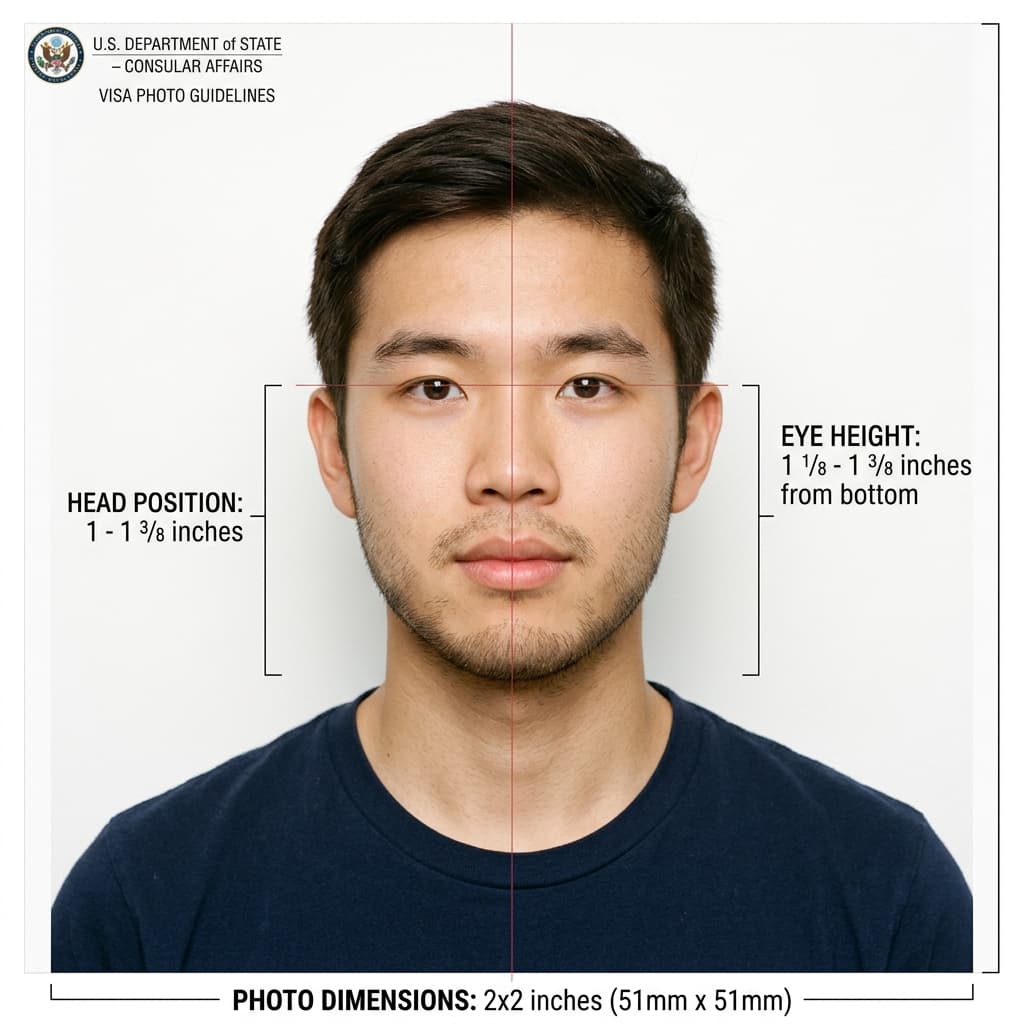
U.S. Department of State Visa Photo Guidelines
Format Your Photo Instantly
Take or choose a front-facing photo from your camera or gallery. Preview the cropped US visa photo with an official white background for free.
US visa photo formatted to 600x600 px for United States
Choose a photo or drag it here
JPEG, PNG, or WebP up to 20 MB · Front-facing camera or portrait
Select PhotoPassport Photo Checklist:
How to make your US visa photo
- 01
Upload a photo
Use a recent, front-facing photo taken in good light. A phone photo works if your whole head and the top of your shoulders are in frame.
- 02
Automatic crop and background
The tool centers your face in a square frame and replaces the background with plain white.
- 03
Check the preview
Look at the result before you pay. If something looks off, upload a better source photo and try again at no cost.
- 04
Download and submit
Download the 600×600 px JPEG for your online application. Use the print sheet if your consulate asks for a paper photo.
What you get
- A square 600×600 px JPEG for the DS-160 or DS-260 photo upload.
- The same photo laid out for printing at 2×2 inches, for consulates that ask you to bring a printed photo.
- A download link sent to your email, valid for 72 hours after purchase.
Tips for a usable visa photo
- Face the camera straight on with a neutral expression or a natural smile, both eyes open.
- Take off your glasses. Hats and head coverings are only allowed for religious or medical reasons.
- Use even light from the front so there are no shadows on your face.
- Do not use a selfie at arm's length. Ask someone to take the photo from about 4 feet away.
If the visa form rejects your upload
The tool's file is a square 600×600 px JPEG. Check that it is 240 KB or less before you upload it. Once the format is right, most remaining errors come from the photo itself: shadows, glasses, a tilted head or an old picture.
For step-by-step fixes to a failed DS-160 upload, including what to do if it keeps failing, see the DS-160 photo maker page.
Frequently Asked Questions
What size is a US visa photo?
A US visa photo is 2 × 2 inches (51 × 51 mm) when printed. The digital version for the DS-160 must be square, between 600 × 600 and 1200 × 1200 pixels, in JPEG format and no larger than 240 KB.
Can I take my US visa photo with a phone?
Yes. Ask someone to take it from about 4 feet away in even light, facing the camera. The tool handles the crop, background and pixel size.
How much does the US visa photo cost?
Uploading and previewing are free. You pay $9.99 once to download the digital photo and the printable version.
Is the US visa photo the same as a US passport photo?
The size and rules are the same: 2 × 2 inches, white background, no glasses. A photo made here can be used for either, as long as it is less than 6 months old.
What happens if my visa photo is rejected?
If a consulate rejects it because of its dimensions and you contact us within 30 days, we remake it or refund you. The refund policy explains how to claim.
Can anyone promise the embassy will approve my photo?
No. The consular officer makes the final decision. The tool makes the size, crop and background match the published rules, but your expression, lighting and glasses also matter.
USVisaPhotoAI is an independent photo service. It is not affiliated with the U.S. Department of State, USCIS, or any government agency. Final acceptance of any photo is decided by the agency reviewing your application.