
2x2 Photo Maker
Upload a photo of your face and turn it into a 2×2 inch photo. The tool crops it square around your head, makes the background white, and saves it as a 600×600 px JPEG you can upload or print.
- 2×2 in (51×51 mm)
- 600×600 px JPEG
- White background
- 4×6 print sheet
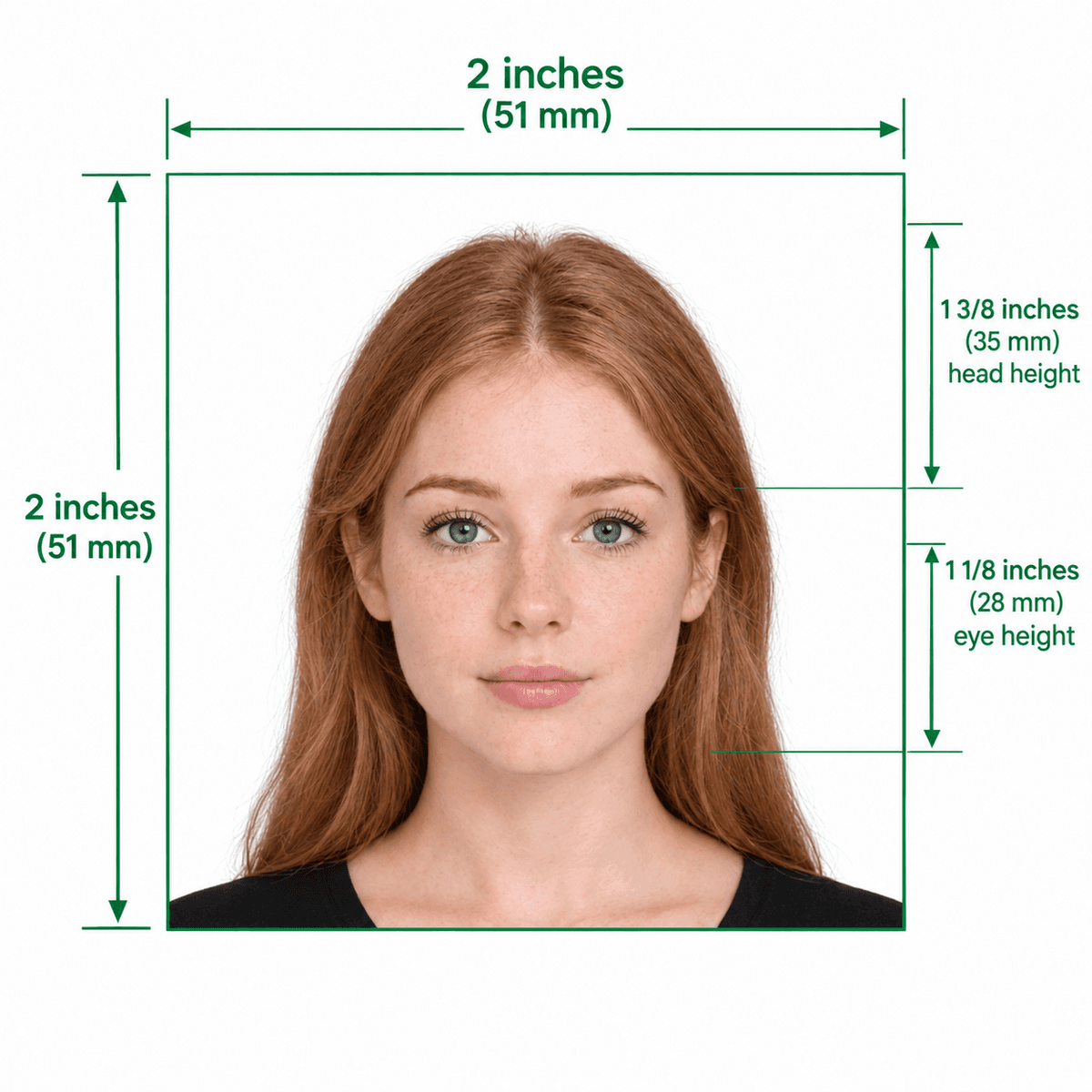
Official 2×2 Inch (51×51 mm) Dimensions Guide
Format Your Photo Instantly
Take or choose a front-facing photo from your camera or gallery. Preview the cropped 2×2 photo with an official white background for free.
2×2 photo formatted to 600x600 px for United States
Choose a photo or drag it here
JPEG, PNG, or WebP up to 20 MB · Front-facing camera or portrait
Select PhotoPassport Photo Checklist:
How to make a 2x2 photo
- 01
Upload any clear photo
A front-facing phone photo is fine. Keep your whole head and the top of your shoulders in frame, with even light on your face.
- 02
Crop to 2×2 and whiten the background
The tool centers your head in a square frame sized for a 2×2 inch photo and replaces the background with plain white.
- 03
Preview, then download
Check the free preview. If you like it, pay $9.99 once to download the 600×600 px JPEG.
- 04
Print at actual size
Put the photo on a 4×6 sheet with the free print template generator and print it at 100% scale so each photo comes out exactly 2×2 inches.
Which US documents use a 2x2 photo
- US passport applications and renewals, including passport cards.
- US visa applications, such as the DS-160 and DS-260 photo uploads.
- Green card and other USCIS forms that ask for passport-style photos.
- The Diversity Visa (DV) lottery entry, which takes a digital 600×600 px JPEG.
How to print a 2x2 photo at the right size
Most stores and home printers print 4×6 inch sheets, so the easiest route is a 4×6 sheet with several 2×2 photos on it. The free print template generator builds that sheet in your browser.
When you print, choose 100% or "actual size". "Fit to page" or "fill" settings rescale the image, and your photos will no longer measure 2×2 inches. Measure one with a ruler before you cut it out.
Frequently Asked Questions
How many pixels is a 2x2 photo?
At 300 DPI, a 2×2 inch photo is 600 × 600 pixels. At 600 DPI it is 1200 × 1200 pixels. The tool exports 600 × 600 px, which is the size most US online forms ask for.
Can I convert a photo I already have to 2x2?
Yes, if your face is clear, facing the camera and not cut off. Upload it and the tool re-crops it to a square around your head and replaces the background with white.
Is a 2x2 photo the same as a passport photo?
For US documents, yes. US passports, visas and most USCIS forms all use the same 2×2 inch size with a white background.
Why did my printed 2x2 photo come out the wrong size?
The printer probably scaled the sheet. Print the 4×6 sheet at 100% or actual size, and turn off fit to page, borderless or fill options.
Is a 2x2 inch photo the same as 5x5 cm?
Close, but not exactly. Two inches is 50.8 mm, so a 2×2 photo is about 51×51 mm. A 5×5 cm print is slightly smaller, so for US documents print at 2×2 inches.
Do I pay extra for the print sheet?
No. Previewing is free, the photo download is $9.99 once, and the 4×6 print sheet generator costs nothing. The emailed download link stays valid for 72 hours.
USVisaPhotoAI is an independent photo service. It is not affiliated with the U.S. Department of State, USCIS, or any government agency. Final acceptance of any photo is decided by the agency reviewing your application.