
Print Passport Photos
Make your US passport photo here, place six copies on a 4×6 sheet with the free print generator, and order that sheet as an ordinary photo print at a store or print it at home.
- 2×2 in prints
- Six photos per 4×6 sheet
- Store or home printer
- Free sheet generator
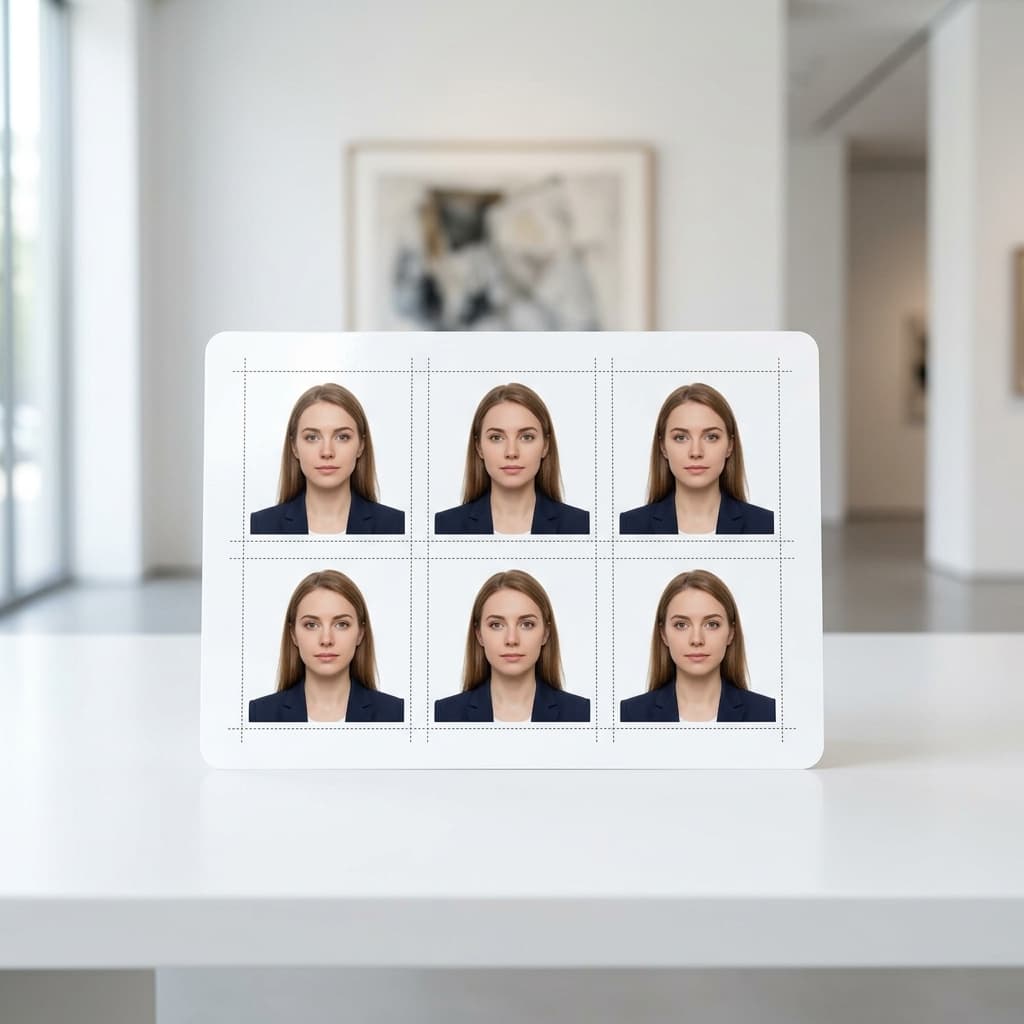
4×6 Printable Passport Photo Sheet Template
Format Your Photo Instantly
Take or choose a front-facing photo from your camera or gallery. Preview the cropped US passport photo with an official white background for free.
US passport photo formatted to 600x600 px for United States
Choose a photo or drag it here
JPEG, PNG, or WebP up to 20 MB · Front-facing camera or portrait
Select PhotoPassport Photo Checklist:
How to get printed passport photos
- 01
Make and download your photo
Upload a front-facing photo above, check the free preview, then download the finished 2×2 inch passport photo.
- 02
Build a 4×6 sheet
Open the free print template generator, choose 4×6 paper and the 2×2 inch size, and download the sheet with six photos and cutting guides.
- 03
Order a standard 4×6 print
Upload the sheet to a pharmacy or store photo service as a regular 4×6 print. Pickup times and prices vary by store and location.
- 04
Cut along the guides
Trim each photo along the guide lines with scissors or a paper trimmer, and measure one to confirm it is exactly 2×2 inches.
Ordering at a pharmacy or store
- Order the sheet as a 4×6 print, not as a passport photo product. You are buying a normal photo print.
- Turn off any "fit", "fill" or auto-crop option so the sheet prints at its actual size.
- Matte or glossy finish both work for US passports.
- Check the store's own site or app for pickup times and current prices before you order.
Printing at home
- Use photo paper, not plain printer paper.
- Print at 100% scale. Disable "fit to page" or "shrink to fit" in the print dialog.
- Use a high-quality photo setting so skin tones and the white background look clean.
- Measure a photo with a ruler. Each one should be exactly 2 inches wide and 2 inches tall.
Need a different sheet?
The print template generator is the layout tool itself. It also supports 5×7, 3.5×5, US Letter and A4 paper and runs entirely in your browser, so nothing is uploaded.
Frequently Asked Questions
Where can I print passport photos?
Any store or online service that prints standard 4×6 photos can print your sheet, including many pharmacy and retail photo counters. You can also print it at home on photo paper.
Why print a 4×6 sheet instead of a single photo?
A 4×6 print is the most common photo size, so almost any photo service can make it. One sheet holds six 2×2 inch photos, which gives you spares.
My printed photos came out the wrong size. What happened?
The print was probably scaled or cropped. Reorder the sheet as a 4×6 print with fit, fill and auto-crop turned off, or print at home at 100% scale.
Should I choose matte or glossy paper?
Either is fine. The State Department asks for matte or glossy photo-quality paper. Avoid plain printer paper.
What does printing this way cost?
The preview is free and the digital photo is $9.99 once. The print sheet generator is free. The store or your own printer is the only other cost, and store prices vary.
Can I reuse the photo for a later order?
Yes. Save the downloaded file, because the emailed download link is valid for 72 hours. Remember that the photo must be less than 6 months old when you apply.
USVisaPhotoAI is an independent photo service. It is not affiliated with the U.S. Department of State, USCIS, or any government agency. Final acceptance of any photo is decided by the agency reviewing your application.